프론트엔드 e2e 테스트 도입기 (2) - Playwright
2025년 06월 30일
1. Playwright 도입 이유
기존에 사용했던 Cypress와 달리 Playwright를 선택한 이유는 최근 트렌드로 떠오르고 있다는 점 외에 다양한 장점이 있어 Playwright로 마이그레이션 하게 되었습니다.
1.1 Cypress 보다 다양한 브라우저 및 모바일 지원
이전에 Safari 브라우저 관련 에러가 발생하고 간신히 찾아내서 고친 경험이 있었는데 그게 브라우저 문제인지 몰라 한참 헤맸던 기억이 났습니다. 따라서 위와 같은 실수를 하지 않기 위해 다양한 브라우저에서 테스트 하는 것이 필요했습니다. Playwright는 Chromium, Firefox, Webkit(Safari) 브라우저를 모두 지원합니다. 한 API로 모든 브라우저를 지원한다는 점이 특징인데, Cypress는 Chromium 브라우저에 치중 되어 있습니다.
또한 Playwright는 기본적으로 하나의 테스트 파일 당 하나의 워커를 실행하는데, 테스트 파일이 여러개여도 각각의 워커에서 병렬적으로 실행하여 테스트 진행 속도가 빠르다는 장점이 있습니다. Cypress는 병렬 테스트를 성능 이슈로 인해 권장하지 않는다고 합니다.
마지막으로 지금 회사에서 하고 있는 프로젝트들 기술 스택을 합칠 필요가 있었고 모바일 버전의 프로젝트에 맞춰 모바일도 지원 가능한 Playwright로 통일하기로 했습니다.
2. Playwright 설정 방법
2.1 설치
먼저 프로젝트 폴더에서 아래 명령어를 입력해서 설치해줍니다.
npm install @playwright/test --save-dev
그 후 package.json 파일에 아래 명령어를 추가해줍니다. 미리 말씀드리자면 mock 테스트와 api 테스트를 분리하기 위한 각각의 명령어를 넣어주었습니다.
"scripts": {
  "test:api": "playwright test --config=playwright.api.config.ts",
  "test:mock": "playwright test --config=playwright.mock.config.ts"
}
2.2 API 처리 방법
Playwright를 도입하고 나서 API 통신을 어떻게 처리할 지에 대해 고민했습니다. API 변경 가능성 뿐만 아니라 회원가입 같은 UI나 Flow 등을 테스트 할 때는 굳이 API 통신을 하지 않고 모킹으로 처리해도 괜찮지 않을까 라는 생각이 들었습니다. 그러나 API 통신을 통해 유저 플로우와 동일하게 테스트가 필요한 부분도 분명 있기 때문에 두 가지 모두 고려해서 우리 팀은 모킹과 실제 API 사용하는 것을 각각 분리하기로 했습니다.
실제 Playwright를 도입했던 팀원의 리뷰를 인용하자면 아래와 같습니다.
네! 저는 e2e 관련은 api 라고 가정하고, mock의 경우에는 플로우 검증이라고 생각했어요! 여러 문서 읽어봤을 때, 최종 결과물의 UI 표기 등의 부분은 서버 데이터 표출까지의 검증을 말하는 경우도 많은 것 같아 우선은 api 루트는 그렇게 설정을 해두었습니다. (특히나 db 자체를 docker로 local에서 돌리고 있기에 포함시켜도 문제가 없을 거라고 판단했습니다.)
그리고 mock은 사실 signup을 확인하기 위한 부분이 가장 큰 것 같습니다. signup 과정에서 여러 테스트를 돌리며 email이 중복되는 문제가 있어 DB 삭제 -> 테스트 재진행은 맞지 않다고 생각했고, 메일 전송도 매번 발생한다는 점이 좀 걸렸습니다...🥺 물론 추후에 기타 admin 관련 부분이 mock으로 들어가게 될 수도 있겠다는 생각은 합니다!
결론적으로 정리하자면
- test:api : 최종 프로덕트에 대한 동작, 결괏값 검증(db 관련 문제가 발생하지 않는 경우)
- test:mock : 회원가입 등 중복 체킹 항목이 있거나 서버 부담이 가해지는 경우, 단순히 프론트엔드 동작 테스트만 진행해도 될 경우 라고 설정하고 테스트 코드 구성했습니다!
2.3 config 설정 분리
Mock 테스트와 API 테스트를 분리하기 위해 각각의 config 파일을 분리했습니다.
Playwright를 설치하면 기본적으로 하나의 playwright.config.ts 파일이 생성되는데 이 파일을 수정하여 각각의 config 파일을 분리했습니다.
playwright 안에 tests 폴더 안에 각각 api와 mock 폴더를 생성하고 각각의 config 파일을 생성했습니다.
// playwright.api.config.ts
import { defineConfig, devices } from '@playwright/test'

/**
 * Read environment variables from file.
 * https://github.com/motdotla/dotenv
 */
// import dotenv from 'dotenv';
// import path from 'path';
// dotenv.config({ path: path.resolve(__dirname, '.env') });

const mock = process.env.MOCK || 'false'

console.log('>>> Playwright config MOCK:', mock)
/**
 * See https://playwright.dev/docs/test-configuration.
 */
export default defineConfig({
  testDir: './playwright/tests/__api__',
  /* Run tests in files in parallel */
  fullyParallel: true,
  /* Fail the build on CI if you accidentally left test.only in the source code. */
  forbidOnly: !!process.env.CI,
  /* Retry on CI only */
  retries: process.env.CI ? 2 : 0,
  /* Opt out of parallel tests on CI. */
  workers: process.env.CI ? 1 : undefined,
  /* Reporter to use. See https://playwright.dev/docs/test-reporters */
  reporter: 'html',
  /* Shared settings for all the projects below. See https://playwright.dev/docs/api/class-testoptions. */
  use: {
    /* Base URL to use in actions like `await page.goto('/')`. */
    baseURL: 'http://localhost:5173',

    /* Collect trace when retrying the failed test. See https://playwright.dev/docs/trace-viewer */
    trace: 'on-first-retry',
  },

  /* Configure projects for major browsers */
  projects: [
    { name: 'setup', testMatch: /.*\.setup\.ts/ },
    {
      name: 'chromium',
      use: { ...devices['Desktop Chrome'] },
      dependencies: ['setup'],
    },

    {
      name: 'firefox',
      use: { ...devices['Desktop Firefox'] },
      dependencies: ['setup'],
    },

    {
      name: 'webkit',
      use: { ...devices['Desktop Safari'] },
      dependencies: ['setup'],
    },

    /* Test against mobile viewports. */
    // {
    //   name: 'Mobile Chrome',
    //   use: { ...devices['Pixel 5'] },
    // },
    // {
    //   name: 'Mobile Safari',
    //   use: { ...devices['iPhone 12'] },
    // },

    /* Test against branded browsers. */
    // {
    //   name: 'Microsoft Edge',
    //   use: { ...devices['Desktop Edge'], channel: 'msedge' },
    // },
    // {
    //   name: 'Google Chrome',
    //   use: { ...devices['Desktop Chrome'], channel: 'chrome' },
    // },
  ],

  /* Run your local dev server before starting the tests */
  webServer: {
    command: 'npm run dev',
    url: 'http://localhost:5173',
    reuseExistingServer: false,
    timeout: 10 * 1000,
    stdout: 'pipe',
  },
})
// playwright.mock.config.ts
import { defineConfig, devices } from '@playwright/test'

/**
 * Read environment variables from file.
 * https://github.com/motdotla/dotenv
 */
// import dotenv from 'dotenv';
// import path from 'path';
// dotenv.config({ path: path.resolve(__dirname, '.env') });

const mock = process.env.MOCK || 'false'

console.log('>>> Playwright config MOCK:', mock)
/**
 * See https://playwright.dev/docs/test-configuration.
 */
export default defineConfig({
  testDir: './playwright/tests/__mock__',
  /* Run tests in files in parallel */
  fullyParallel: true,
  /* Fail the build on CI if you accidentally left test.only in the source code. */
  forbidOnly: !!process.env.CI,
  /* Retry on CI only */
  retries: process.env.CI ? 2 : 0,
  /* Opt out of parallel tests on CI. */
  workers: process.env.CI ? 1 : undefined,
  /* Reporter to use. See https://playwright.dev/docs/test-reporters */
  reporter: 'html',
  /* Shared settings for all the projects below. See https://playwright.dev/docs/api/class-testoptions. */
  use: {
    /* Base URL to use in actions like `await page.goto('/')`. */
    baseURL: 'http://localhost:5173',

    /* Collect trace when retrying the failed test. See https://playwright.dev/docs/trace-viewer */
    trace: 'on-first-retry',
  },

  /* Configure projects for major browsers */
  projects: [
    { name: 'setup', testMatch: /.*\.setup\.ts/ },
    {
      name: 'chromium',
      use: { ...devices['Desktop Chrome'] },
      dependencies: ['setup'],
    },

    {
      name: 'firefox',
      use: { ...devices['Desktop Firefox'] },
      dependencies: ['setup'],
    },

    {
      name: 'webkit',
      use: { ...devices['Desktop Safari'] },
      dependencies: ['setup'],
    },

    /* Test against mobile viewports. */
    // {
    //   name: 'Mobile Chrome',
    //   use: { ...devices['Pixel 5'] },
    // },
    // {
    //   name: 'Mobile Safari',
    //   use: { ...devices['iPhone 12'] },
    // },

    /* Test against branded browsers. */
    // {
    //   name: 'Microsoft Edge',
    //   use: { ...devices['Desktop Edge'], channel: 'msedge' },
    // },
    // {
    //   name: 'Google Chrome',
    //   use: { ...devices['Desktop Chrome'], channel: 'chrome' },
    // },
  ],

  /* Run your local dev server before starting the tests */
  webServer: {
    command: 'npm run dev',
    url: 'http://localhost:5173',
    reuseExistingServer: false,
    timeout: 10 * 1000,
    stdout: 'pipe',
  },
})
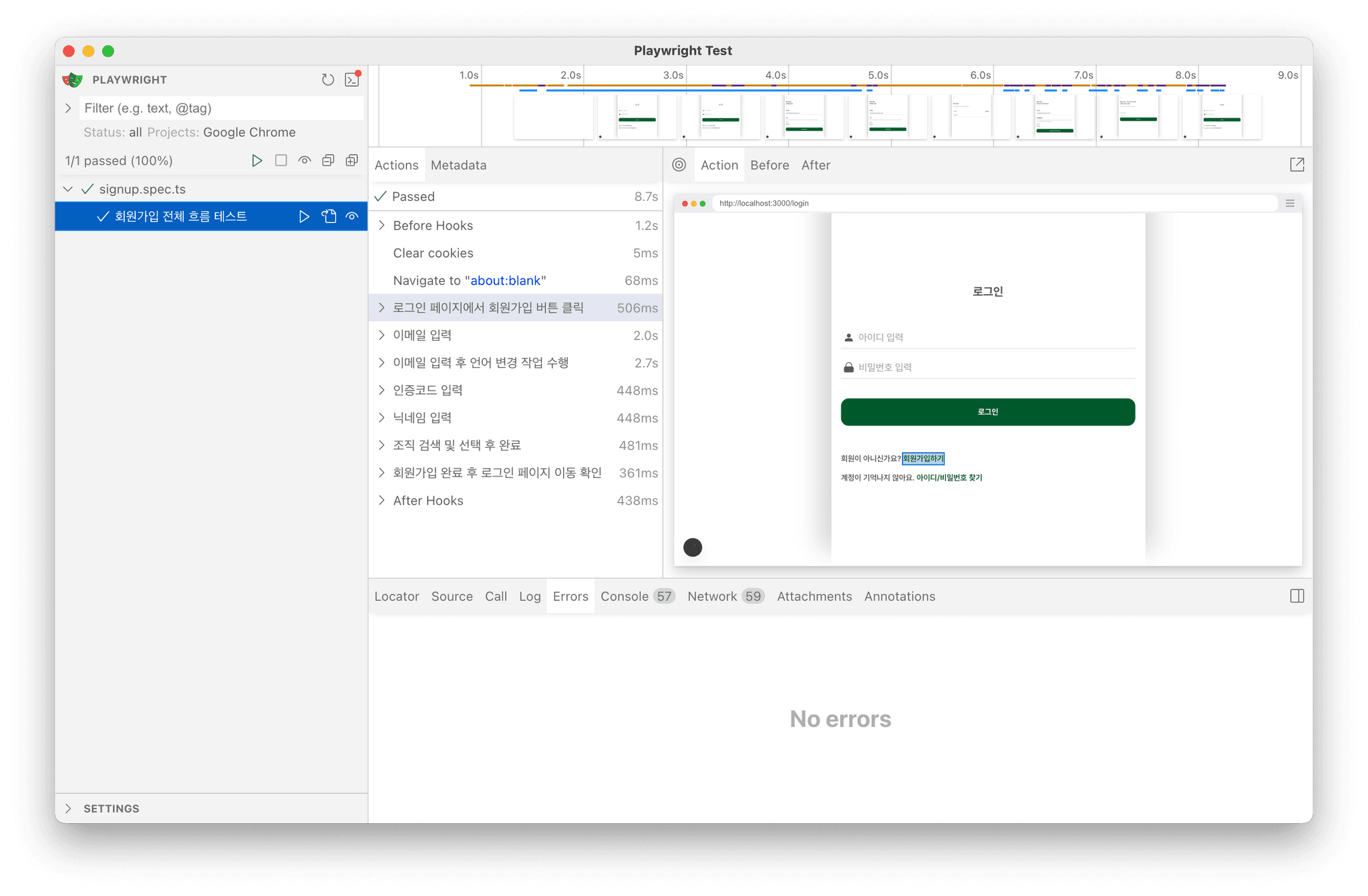
2.4 실행 화면
명령어를 통해 실행하면 아래와 같은 화면을 볼 수 있습니다.
3. 유저 인증 구현
사실 API 통신을 하거나 특정 테스트를 위해 로그인 작업이 사전에 되었어야 하는 경우가 많을겁니다. 저희 프로젝트도 역시 그러했고 로그인 성공 시 토큰을 받아오고, 그 토큰을 통하여 API 호출이 이루어지기 때문입니다. Playwright는 Authentication 기능을 제공하기 때문에, 로그인을 테스트 마다 사전에 진행하도록 설정할 수 있습니다.
3.1 auth 파일 생성
API 모킹 테스트가 아닌 실제 API 통신이 이루어지는 경우에만 유저 인증 과정을 넣을 것이기 때문에 저는 __api__ 폴더 안에 공식 문서대로 auth.setup.ts 파일을 생성하였습니다.
코드는 아래 로직처럼 작성했는데 여기서 중요한 것은 authFile이 인식할 수 있도록 아래 폴더 경로에 맞춰 만들어주었고 또한 auth.json은 민감한 정보기 때문에 반드시 gitignore에 추가해주어야 합니다.
이렇게 만든 이유는 테스트 환경에서는 실제 브라우저가 아니니 토큰을 파일 형태로 저장해서 꺼내 쓰기 위함입니다.
import { test as setup } from '@playwright/test'

const authFile = 'playwright/.auth/auth.json'
setup('유저 인증 테스트', async ({ page }) => {
  const username = process.env.TEST_USERNAME || 'test.user'
  const password = process.env.TEST_PASSWORD || 'test1234'
  await page.goto('/signin')
  await page.fill('input[name="username"]', username)
  await page.fill('input[name="password"]', password)
  await page.getByRole('button', { name: 'Sign in' }).click()
  await page.waitForURL('/dashboard')
  await page.context().storageState({ path: authFile })
})
3.2 config 파일에 auth.json 연결
위에 이미 파일이 있지만 projects 안에 setup으로 아까 작성한 auth.setup.ts 파일을 연결해줍니다.
...
 projects: [
  { name: "setup", testMatch: /.*\.setup\.ts/ },
  ...
 ]
4. 테스트 코드 도입 후 달라진 점
기존에는 기억에 의존 혹은 특정 로직이 수정했을 때 일일이 이슈를 체크해가면서 어떻게 바뀌었는지 그리고 다른 작업에 지장이 없는지 확인해야했습니다. 이러한 점을 해결할 수 있었고 또 추후 기능 혹은 프로젝트 문서화를 할 때 테스트 코드를 참고하여 직관적인 문서화가 가능할 수 있겠다는 점입니다. 그리고 가장 중요한 점은 역시 사전에 발견할 수 없었던 에러를 발견해낼 수 있었습니다. 이로 인해 코드의 안정성이 대폭 향상 되었고 또 스스로 코드를 작성할 때 테스트 코드를 염두에 두면서 보다 더 직관적으로 코드를 작성하는 법을 생각하면서 작업을 하게 되었습니다.
5. 결론
결론적으로 테스트 코드 도입은 굉장히 큰 효과를 가져 왔으며 실제로 GitHub Actions를 통해 CI/CD 파이프라인을 구축하여 보다 더 안정성 있는 프로덕션 환경을 구축할 수 있었습니다. 파이프라인 구축 과정은 다음 글에서 살펴보도록 하고 이번 글에서는 테스트 코드 도입 과정을 공유해보았습니다. 아직은 부족하지만 점점 더 테스트 코드와 친해져보도록 노력해야겠습니다. 감사합니다.